Staff Skill Building
Invoicing Sewing Orders
|
Most Nu-Way customers are aware that our Bittersweet location handles all our repairs and alterations. However, you will encounter customers who come to other locations requesting repairs and or alterations as well. Sewing orders are invoiced within CleanSuite just as any other order. However, you will need to keep a few things in mind and take a few additional steps in order to complete the process.

Step 2 - Tag It: You will need to add a PINK sewing tag to all these types of orders. Check all the boxes which apply to the order you have invoiced. Don't forget to write the DUE DATE on this tag. Lastly, indicate what kind of cleaning and pressing is to be done on the item. Is it to be C&P (Cleaned and Pressed), PO (Pressed ONLY), or will it be NCP (NO CLEAN OR PRESS). SEE EXAMPLE A ON THE RIGHT.
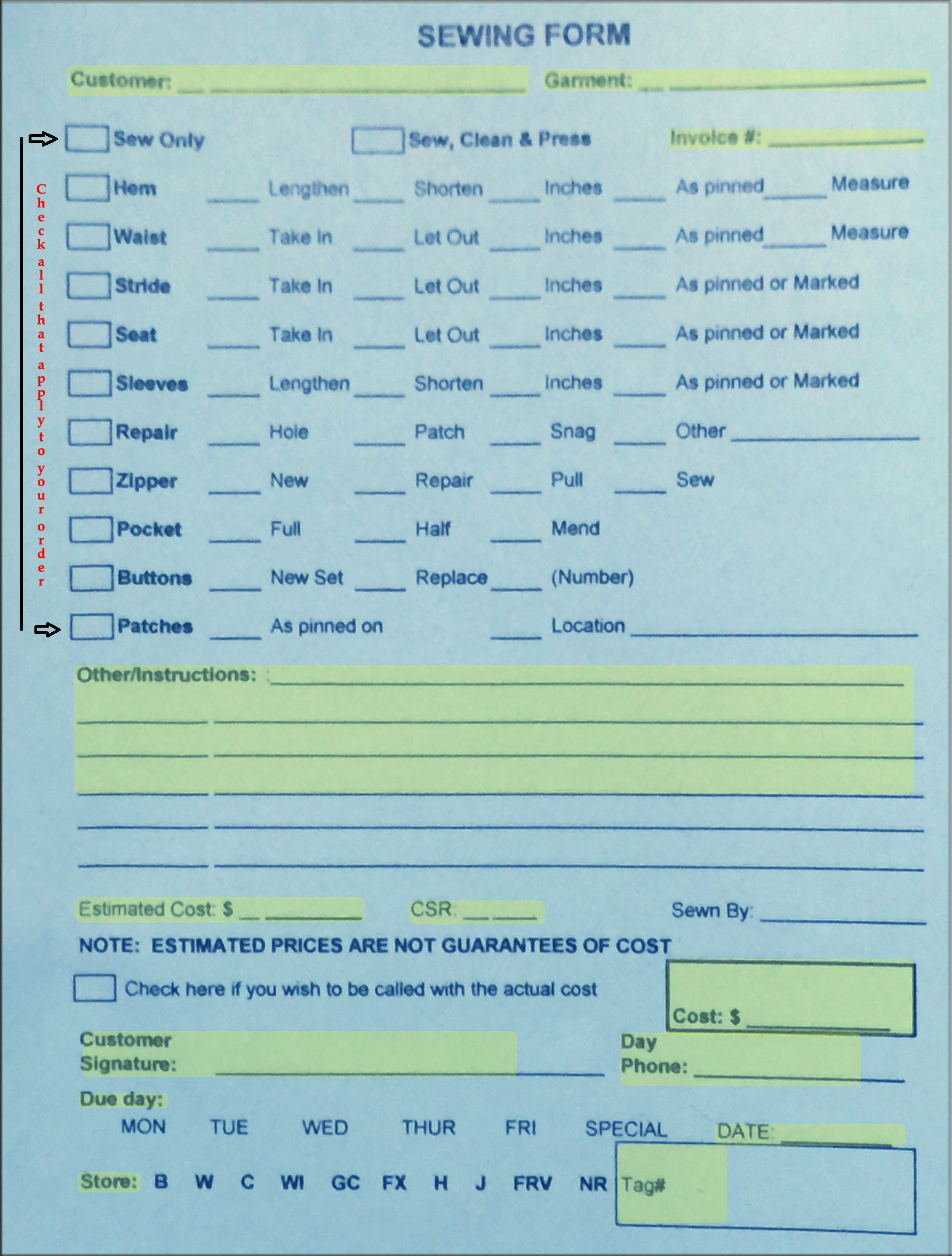
Example B - BLUE SEWING FORM
|
Step 1 - Invoice It: You will invoice sewing request as you would any other item in CleanSuite. Once you have the correct customer pulled up, begin by pressing F5 to create a new invoice. Now select REPAIRS. Finally, select the appropriate sewing/repair/alteration from the list. Each order should be hung on a single hanger to be sent to the sewing department. Be sure that if you have more than one order for the same customer that you tie them together with a twist tie.
IMPORTANT NOTE: If you can not find an appropriate match in the REPAIR items list, don't panic! Simply invoice the item as a REPAIR --> Miscellaneous. But, DON'T FORGET to add what the actual repair/alteration request is in the NOTES field of the invoice. 
Example A - PINK SEWING TAG
Step 3 - BLUE FORM OR BUST! Every single sewing/alteration/repair order MUST have a BLUE SEWING FORM completely filled out in order to be completed. Be sure to check all the boxes which describe your order. In addition to this, all highlighted parts of the example form on the left are REQUIRED. Most importantly, you MUST get the customers signature! If you have more than one item for the same customer use common sense. For example: If a customer has two pairs of pants and wants both of them to be hem-ed the same length, you may put both items on the same blue form. But, if you have multiple items with completely different requests for each of them you might decide to fill out separate blue forms to avoid confusion. If you do use more than one blue form for the same customer, be sure you are VERY SPECIFIC IN THE NOTES FIELD ABOUT THE REQUEST FOR EACH ITEM. DON'T FORGET TO INDICATE HOW MAY ITEMS THE CUSTOMER HAS IN TOTAL ON EVERY FORM YOU FILL OUT FOR THAT CUSTOMER. SEE EXAMPLE B ON THE LEFT. NOTE: If your not sure of the price or have no price for the job because you had to invoice the item as a REPAIR --> MISC please write $0.00 in the price box and the sewing department will adjust the invoice as needed. 
IMPORTANT: VIP CUSTOMERS DO NOT GET VIP DISCOUNT ON SEWING. THEY MUST USE A COUPON TO GET A DISCOUNT.
|
Invoicing Fur, Leather & Suede
When invoicing Fur, Leather or Suede items, you will need to fill out the form below in addition to creating an invoice in CleanSuite. Be sure you completely fill in all the Highlighted areas and make sure that the customer signs the pink side of the form. Once completed, send this whole form along with the invoice and item to the Garden City cleaning location to be processed.
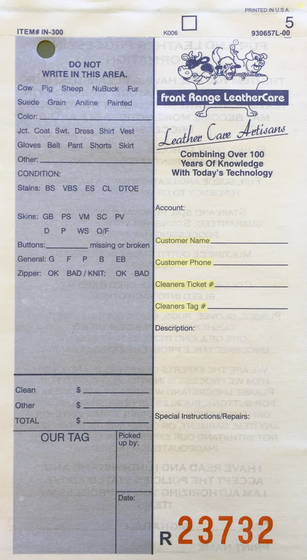
Side 1
|
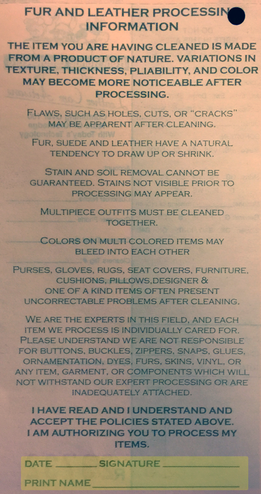
Side 2
|

IMPORTANT: DO NOT USE SPOT TAGS ON FUR, LEATHER OR SUEDE. THE GLUE FROM THE STICKERS CAN HARM THE MATERIAL. IF THE ITEM NEEDS TO BE SPOTTED, TYPE IT IN THE NOTES FIELD OF THE INVOICE YOU MAKE WITHIN CLEANSUITE! ONCE THE INVOICE HAS PRINTED, BE SURE TO HIGHLIGHT THE NOTE YOU TYPED WITH A HIGHLIGHTER MARKER.
|
If you have questions about any part of these procedures please seek assistance from a Manager. Now that you have sewing and repairs / leather under your belt, lets move on. Next, we will take a look at how to correct some common mistakes that we all make from time to time. Click on the button below to continue.